General Trading
Why is my account blocked? What do I do?
Please contact our Live Chat support so we can assist you accordingly.
If I send new deposit on Saturday or Sunday - is it going to enhance my free margin immediately? Am I going to be safe on Monday, at market opening?
Deposits can be made over the weekend. As soon as deposit hits the account, balance and equity are updated, therefore enhancing free margin.
All payment processing is being done by the third-party payment processors (i.e., Bitcoin, Instacoins, Ethereum, etc.) and their functionality cannot be guaranteed.
Some payment methods are not instant and may take longer than usual especially during market opening when payment systems are just getting online.
Be sure to only place trades based on your current balance and not in anticipation of raising the said balance.
An internal transfer erased my deposit bonus. Can I get it back?
Please send your specific request (explained briefly) to payments@midasfx.com and our Finance department will check and get back to you. Please use your registered email address for correspondence.
Can I have micro, mini, nano, cent account? I do not want to trade big.
Midas FX offers standard trading accounts only. However, on each offered trading account type you can trade as little as 0.01 lots on any currency pair.
Can I personalize my trading account number?
Please note that trading account numbers are system-generated. Therefore, we cannot change or alter it.
Can I trade cryptos over the weekend since crypto market is active during Saturdays and Sundays?
Yes, crypto trading is available 24/7 on both our MT4 and MT5 platforms!
Do you allow copy trading?
Yes, we do allow our clients to use copy trading. Upon engaging such third party services, our clients are expected to understand the risks associated. We suggest you initially test any services out with either a demo account (if possible) or a small deposit.
Do you allow scalping and news trading?
Yes, we allow scalping and news trading. We allow all trading strategies.
Do you have Islamic accounts?
Currently we do not offer Islamic accounts.
Do you have MAMM or PAMM accounts?
Unfortunately, we do not offer managed (MAMM/PAMM) accounts. However, you may use MetaTrader's built-in feature – trading signals.
You can register one account as a signal provider and other accounts can subscribe to its signal. Trades on provider account will be copied to the subscribed accounts.
More information and instructions can be found here — https://www.metatrader4.com/en/trading-platform/help/signals/signal_provider
Do you have stock indices?
Yes, we offer a variety of stock indices for trading.
Do you offer “corporate” accounts?
Yes, we accept both personal and corporate accounts.
Do you provide tax statements?
Please note that as an off-shore brokerage, we do not provide any tax-related documents. Also, we do not send our client’s information to third parties.
You can generate your official annual history report (statement) directly from MT4 platform >> Account history tab.
In order to make a statement out of the account history, you’ll first have to go to the Terminal window of MetaTrader 4 and select the Account History tab. By right clicking on a mouse and selecting “Save as Report” or “Save as Detailed Report” a HTML form statement can be created. You may choose a folder where you wish the save the statement.
Changing the Time Period
You can change the time period from where the account actions are taken from in the same menu when saving the report. You can use the following settings:
· All History shows all the account events since the first deposit.
· Last 3 Months shows the events from current time to the last three months.
· Last Month shows the events from last month starting from current time.
· Custom Period… allows you to set a custom date range.
For more information on tax related inquiries please consult your legal or tax advisor.
Does high leverage 1:1000 mean high risk? Should I avoid 1:1000 leverage no matter what?
Please note that the maximum leverage setting allows your account to open a position bigger than your deposit. At the highest setting you can still open the lowest lot size available.
The risk comes from choosing how much volume you want to trade and your allowable stop loss level.
It is the clients responsibility to plan out their leverage and trading volume based on their risk management.
How can I report a problem with a trade?
Any question or clarification in relation to a trade must be sent to support@midasfx.com including your order ID and account number. Supporting screenshots may be included.
The email should be sent from your registered email address with us.
Our Support Department will investigate the issue and will send a reply within 24 hours.
How can I trade Binary options?
Please note that we do not offer Binary options. We only offer Forex, Metals, Energies, Stock Indices and Cryptocurrencies.
How is swap calculated and where do I find swap rates?
Swap fee is charged when you carry over a position from one trading day to the next. The charge may be positive or negative depending on the currency pair and the type of your trade (buy or sell). It is calculated using the following formula:
Swap = (Pip Value * Swap Rate * Number of trading days)
You can find the Swap Rate in your MetaTrader 4 trading terminal. You must ‘Right click” on your chosen instrument in the ‘Market Watch’ section, and then choose the ‘Specification’ option from the dropdown menu.

Note: Carrying over a position from Wednesday to Thursday, a triple charge is taken since during the entire weekend swap is charged only once. The ‘3-days swap’ is a standard in FX industry with all brokers and financial institutions.
I have made a deposit but I don’t see it in my account.
Please note that some payment methods are not instant. Kindly check if the deposit transaction is already Completed in your Private Office > Payments History section.https://my.midasfx.com/payments
- If transaction is Completed:
- Please locate which account number (under the ‘Account’ column) to which the deposit was credited.
- Try logging in to MetaTrader using the same account number. The balance should show up immediately without issues if your account is properly connected.
- If transaction is NOT Completed:
Please contact our Live Chat support or send us an email.
I have sent Bitcoin to your address but it is not in my account
Cryptocurrency transactions are not instant. After you have successfully sent the funds, it will be credited to your trading account once the transaction receives a minimum of 6 confirmations.
This can take anywhere between several minutes to hours, depending on how fast or slow the Bitcoin network is at the time of the deposit.
You may track its status by pasting the used wallet address on the Blockchain search bar. — https://www.blockchain.com/explorer
Is it possible for my account to go negative?
Yes, trading accounts can go negative. Please note that we are true ECN broker, all orders are sent directly to market and are executed at the best available prices, therefore we cannot offer negative balance protection.
Is your DEMO account exactly the same (same prices and execution), as your LIVE account?
Please note that we receive price feed directly from our Liquidity Providers and we give priority to our Live accounts over the Demo accounts. Almost always the feed on live accounts is completely the same as the feed on demo accounts, however a small discrepancy in the price can occur at times so they may differ.
Orders from live accounts are sent to the market and filled at best available price at time being. They have Market Execution and must be filled with the counter-party, one of the Liquidity Providers from liquidity pool. During news time and/or low liquidity periods, order execution time can be heavily increased.
On the other hand, trades from demo accounts are not sent to the market and therefore they are opened/closed instantly at requested price (Instant Execution), regardless of the volatility in the market. Therefore, order execution time is lower for orders from demo accounts comparing to the ones from live accounts, especially during news time and/or low liquidity periods.
What account types are available?
MidasFX offers both standard (STD) -- spread-only -- accounts and ECN accounts to all clients.
What are your limitations on the number of trades and trade size?
Please note that we do not have limitations on the number of trades that you can place as it depends on your balance, lot size and pair traded.
With regards to the trade size, you can trade up to a maximum of 1000 lots for MT4 accounts and 100 lots for MT5 accounts.
What are your trading commissions?
What does “drawdown” mean?
“Drawdown” refers to the decrease of a trader’s capital after a series of losing trades. Traders usually note this down as a percentage of their trading account. This is typically applied for risk management of one’s trading system.
What is the best deposit method you advise me to use?
The best deposit method is the one that suits your trading needs, availability of payment methods in your region and prior experience.
We would like to suggest that you try a well accepted deposit/withdrawal method called Bitcoin. It is worldwide available, efficient, not expensive.
You just need to sign up with an e-wallet such as coinbase (www.coinbase.com), buy bitcoins and simply send to the address provided in your Client Office. Usually, it takes from several minutes to several hours for funds to hit your trading account.
What is the commission for cryptocurrency trading?
Please note that commission rate for cryptocurrency trading is 0.0025% per side, for a total of 0.005% of the nominal value of the instrument traded.
Example: 1.0 Lots BTCUSD at $17,000 — Contract Size is 10 per lot, so the Total value of trade is $170,000. Therefore the commission is $170,000 * 0.005% = $8.40.
Also note that commission for cryptocurrency trading is charged on all account types.
What is the difference between demo and live accounts?
Please note that demo accounts do not use real money as it’s intended for practice trading purposes only. We offer demo accounts for free with no verification needed.
On the other hand, live accounts use real money. Your account must be fully verified before you can make a deposit.
What is the minimum order size for Metals and Indices?
The minimum lot size for all instruments on all account type is 0.01 Lots.
What is your spread for ECN accounts?
Please note that spread is not constant as it depends on the market conditions. It can get as low as 0 on ECN accounts.
What is your stop out level? How is it calculated?
Please contact our Live Chat support so we can assist you accordingly.
What is your stop out level? How is it calculated?
Please contact our Live Chat support so we can assist you accordingly.
What leverage do you offer and does it change based on account balance?
Please note that the maximum leverage depends on the account balance. Also, 1:1000 leverage is available for balance lower than $5,000
1. Balance lower than 5,000 – 1:1000
2. Balance from 5,000 to 50,000-1:500
3. Balance from 50,000 to 60,000- 1:400
4. Balance from 60,000 to 70,000-1:300
5. Balance from 70,000 to 80,000- 1:200
6. Balance from 80,000 to 100,000- 1:150
7. Balance from 100,000- 1:100
Maximum leverage for non-currency instruments is: for metals – 1/2 of your account leverage, for other instruments – 1/8
What time zone is your trading server?
Please note that our trading server is tied to Europe time zone. During summer, it follows GMT+3 while during winter, GMT+2.
You can use http://www.thetimezoneconverter.com/ to convert MT4 Server time to your own local time for convenience.
What type of trading instruments are available?
On our MT4 and MT5 platforms, we offer Forex, Metals, Energies, Stock Indices and Cryptocurrencies
Why can I no longer access my trading account in MT4? It is also missing from my Client Office.
Trading accounts expire and may be deleted or archived.
For demo accounts, it expires and automatically deleted from the system, if not used after 30 days straight. It can no longer be reinstated after removal.
For live accounts, it is archived if not used for a period of time, usually after 4 – 6 months.
Archived accounts may only be reactivated for the reasons of accessing account statements and small balance transfers.
Why does it say “Not Enough Money” when I try to place a trade?
The message “Not Enough Money” means that the Free Margin of your account is not sufficient to cover the amount of margin required to open your desired order.
Margin requirement depends on the lot size/volume and leverage.
For example, to open a position of 0.01 lot of USDCHF with a leverage of 1:1 required margin would be:
1,000 (0.01 lot) / 1 (leverage) = $1,000
If you set leverage to a maximum 1:1000 for example, the required margin would be $1.
Please check leverage level of your account in your Client Office >> Live accounts section >> View All – https://my.midasfx.com/account/list
Then, adjust it accordingly by clicking on the current leverage and selecting a new level from the drop-down list.

Note: You must restart MetaTrader 4 after changing your leverage for changes to be applied.
Why was my trade closed before the candle on the chart reached my stop loss?
Please contact our Live Chat support so we can assist you accordingly.
Why was my trade closed before the candle on the chart reached my stop loss?
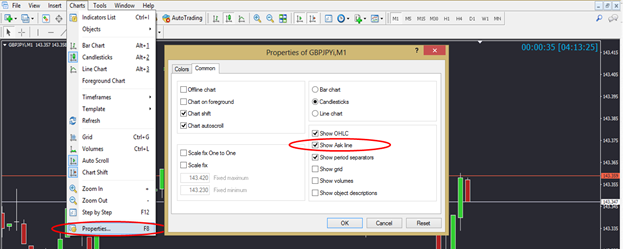
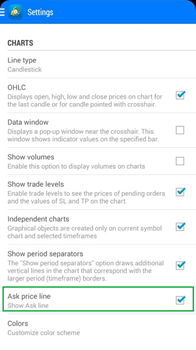
Please note that Sell orders are Buy at closure that closes at the Ask price. Due to the spread, the Ask price is higher than the Bid price. Please note that the MT4 platform draws its candles using Bid prices only, so you must take spreads into account and consider the Ask price.
To see the ASK line in MT4:
(desktop) Right click the chart and click Properties >> Common >> Show ASK line
(mobile) Go to Settings >> Charts >> Ask price line
If you require further information, please send us an email (from your registered email address) to support@midasfx.com Please include your trading account number and the order ID/s of the trade/s (order ID can be found on your MT4 Platform > Terminal > Trade or Trade History tab). Our senior colleagues will investigate the issue and get back to you within 24 hours during business days.
What hours can I trade?
| Symbol | Description | Daily Trade Session | Friday Close |
| All Forex Pairs | 00:00 - 24:00 | 23:55 | |
| XAUUSD | Gold | 1:05 - 23:55 | 23:55 |
| XAGUSD | Silver | 1:05 - 23:55 | 23:55 |
| XCUUSD | Cooper | 1:05 - 22:55 | 22:55 |
| XTIUSD | Crude Oil | 1:05 - 23:55 | 23:55 |
| XBRUSD | Brent Oil | 3:05 - 23:55 | 23:55 |
| XNGUSD | N.Gas | 1:05 - 23:55 | 23:55 |
| .US30Cash | Mini-sized Dow (USD5) | 1:05 - 23:55 | 23:55 |
| .US500Cash | E-mini S&P 500 | 1:05 - 23:55 | 23:55 |
| .USTECHCash | E-mini NASDAQ-100 | 1:05 - 23:55 | 23:55 |
| .US2000Cash | Russell 2000 | 1:05 - 23:55 | 23:55 |
| .JPN225Cash | Nikkei 225 | 1:05 - 23:55 | 23:55 |
| .UK100Cash | FTSE 100 | 1:10 - 23:55 | 22:55 |
| .DE30Cash | DAX | 1:10 - 23:55 | 22:55 |
| .FRANCECash | CAC 40 | 9:05 - 22:55 | 22:55 |
| .EURO50Cash | EURO STOXX 50 | 9:05 - 22:55 | 22:55 |
| .SW20Cash | SWISS 20 | 9:05 - 22:55 | 22:55 |
| .IT4Cash | Italy 40 | 9:05 - 22:55 | 22:55 |
| .AEXCash | Holland 25 | 9:05 - 22:55 | 22:55 |
| .ESP35Cash | IBEX 35 | 10:05 - 20:55 | 20:55 |
| .AUS200Cash | Australia 200 | 2:55 - 9:30, 10:10 - 23:55 | 22:55 |
| .HK50Cash | Hong Kong 50 | 4:20 - 7:00, 8:00 - 11:30, 12:20 - 21:55 |
21:55 |
| .Cocoa | Cocoa | 11:50 - 20:20 | 20:20 |
| .Coffee | Coffee Arabica | 11:20 - 20:20 | 20:20 |
| .Corn | Corn | 3:05 - 15:45, 16:30 - 21:15 | 21:15 |
| .Soybean | Soybean | 3:05 - 15:45, 16:30 - 21:15 | 21:15 |
| .Wheat | Wheat | 3:05 - 15:45, 16:30 - 21:15 | 21:15 |
| .Cotton | Cotton | 4:05 - 21:10 | 21:10 |
| .Sugar | Sugar | 10:35 - 19:55 | 19:55 |
